Your customer portal
Follow your tickets, view meetings and see your support plan.
NORDIC CRM / CUSTOMER PORTAL
Your tickets, your meetings and the people behind them. Together in one place.
Enter your email. We will send a one-time code, even if you are new here.
Follow your tickets, view meetings and see your support plan.
Submit a ticket or find answers in our guides. You can contact us without a support plan.
Start with your needs. We help with customer access and the right support plan.
Guides, frequently asked questions and help with your Zoho solutions.
Here you see your upcoming, completed and cancelled meetings. To reschedule or cancel, use the links in your confirmation email.
We spend one hour with you on your needs, your Zoho setup and how best to get started. It is free and without obligation.
Already have a support agreement? Log in to the portal to book support, errors and development.
Kick-off meetings are taken by Daniel on weekdays 11–15. All times are shown in Copenhagen time.
Choose your needs. We suggest a plan, and you can request an upgrade or a new agreement.
79 kr.
per user / month, excluding VAT
Email
Normal: 48 service hours
Critical: 24 service hours
0 min. advisory / month
0 h. minor changes / month
129 kr.
per user / month, excluding VAT
Email and phone
Normal: 24 service hours
Critical: 12 service hours
30 min. advisory / month
1 h. minor changes / month
299 kr.
per user / month, excluding VAT
Email, phone and video
Normal: 12 service hours
Critical: 6 service hours
60 min. advisory / month
3 h. minor changes / month
A request does not change your agreement. We clarify needs, booking and terms with you first. Response time means the first qualified response, not a guaranteed resolution.
See all services and agreement terms → Zoho CRM
Brug skabeloner, så mails er ens og hurtige at sende.
Det skal du bruge
✓Mailkonto forbundet til CRM
Gå til kontaktens side, og klik på Send Email øverst til højre.

I det nye vindue klikker du på Insert Template og vælger den skabelon, du vil bruge.
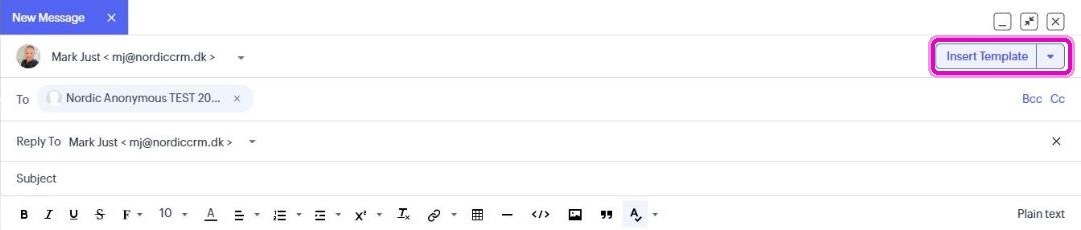
Se efter, at From er den rigtige afsender, og at emnet passer. Ret teksten til.
Klik Send nederst til højre. Vil du sende senere, så brug Schedule.

Sidder du fast?
✓Send Email mangler eller virker ikke – tjek, at din mailkonto er forbundet. Se guiden om at forbinde din mailkonto.
This is optional. We create your contact in CRM. Our team confirms your company and support plan.